> ## Documentation Index
> Fetch the complete documentation index at: https://base-a060aa97-feat-minikit-docs-revamp.mintlify.site/llms.txt
> Use this file to discover all available pages before exploring further.
# Chat Agents in Base App
This guide will cover how you can get started building messaging agents for Base App, using XMTP, a decentralized messaging protocol. Discover a fast, easy way to build and get distribution in Base App.
* Why agents?
* Getting started with XMTP
* Getting featured in Base App
## Why agents?
Messaging is the largest use-case in the world, but it’s more than just conversations—it’s a secure, programmable channel for financial and social innovation. When combined with the onchain capabilities of Base App, builders have a new surface area to build 10X better messaging experiences not currently possible on legacy platforms like WhatsApp or Messenger.
Real Examples:
• Smart Payment Assistant: Text "split dinner \$200 4 ways" and everyone gets paid instantly with sub-cent fees, no app switching or Venmo delays.
• AI Trading Companion: Message "buy $100 ETH when it hits $3,000" and your agent executes trades 24/7 while you sleep.
• Travel Planning Agent: "Book flight LAX to NYC under \$300" and get instant booking with crypto payments, all in your group chat
• Base App & XMTP are combining AI, crypto, and mini apps with secure messaging – to unlock use-cases never before possible. Secure group chats & DMs are the new surface area for developers.
## Getting started
This guide will walk you through creating, testing, and deploying your first XMTP messaging agent. By the end, you'll have a fully functional agent that can send and receive messages on the XMTP messaging network.
**Prerequisites**\
• Node.js (v20 or higher)\
• Git\
• A code editor\
• Basic knowledge of JavaScript/TypeScript
**Resources**
* [Getting Started with XMTP (Video)](https://www.youtube.com/watch?v=djRLnWUvwIA)
* [Building Agents on XMTP](https://github.com/ephemeraHQ/xmtp-agent-examples)
* [Cursor Rules](https://github.com/ephemeraHQ/xmtp-agent-examples/blob/main/.cursor/rules/xmtp.md)
* [XMTP Documentation](https://docs.xmtp.org/)
* [Faucets](https://portal.cdp.coinbase.com/products/faucet)
**STEP 1: SET UP YOUR DEVELOPMENT ENVIRONMENT**
Clone the XMTP Agent Examples Repository:
```bash
git clone https://github.com/ephemeraHQ/xmtp-agent-examples.git
cd xmtp-agent-examples
```
**STEP 2: INSTALL DEPENDENCIES**
Install all required packages:
```bash
npm install
```
**STEP 3: GENERATE KEYS FOR YOUR AGENT**
Run the key generation script to create your agent's wallet:
```bash
npm run gen:keys
```
This creates a .env file with:
```bash
WALLET_KEY=0x... # Your agent's private key
ENCRYPTION_KEY=... # Encryption key for local database
XMTP_ENV=dev # Environment (local, dev, production)
```
**STEP 4: WRITE YOUR AGENT LOGIC**
Create a basic agent that responds to messages:
```javascript
// import the xmtp sdk
import { Client, type XmtpEnv, type Signer } from "@xmtp/node-sdk";
// encryption key, must be consistent across runs
const encryptionKey: Uint8Array = ...;
const signer: Signer = ...;
const env: XmtpEnv = "dev";
// create the client
const client = await Client.create(signer, {encryptionKey, env });
// sync the client to get the latest messages
await client.conversations.sync();
// listen to all messages
const stream = await client.conversations.streamAllMessages();
for await (const message of stream) {
// ignore messages from the agent
if (message?.senderInboxId === client.inboxId ) continue;
// get the conversation by id
const conversation = await client.conversations.getConversationById(message.conversationId);
// send a message from the agent
await conversation.send("gm");
}
```
Then run your agent:
```bash
npm run dev
```
### Getting the address of a user
Each user has a unique inboxId for retrieving their associated addresses (identifiers). One inboxId can have multiple identifiers like passkeys or EVM wallet addresses.
```tsx
const inboxState = await client.preferences.inboxStateFromInboxIds([
message.senderInboxId,
]);
const addressFromInboxId = inboxState[0].identifiers[0].identifier;
```
You can also explore example implementations in the `/examples` folder, including:
* [xmtp-gm](https://github.com/ephemeraHQ/xmtp-agent-examples/tree/main/examples/xmtp-gm): A simple agent that replies to all text messages with "gm".
* [xmtp-gpt](https://github.com/ephemeraHQ/xmtp-agent-examples/tree/main/examples/xmtp-gpt): An example using GPT API's to answer messages.
* [xmtp-nft-gated-group](https://github.com/ephemeraHQ/xmtp-agent-examples/tree/main/examples/xmtp-nft-gated-group): Add members to a group based on an NFT
* [xmtp-coinbase-agentkit](https://github.com/ephemeraHQ/xmtp-agent-examples/tree/main/examples/xmtp-coinbase-agentkit): Agent that uses a CDP for gassless USDC on base
* [xmtp-transactions](https://github.com/ephemeraHQ/xmtp-agent-examples/tree/main/examples/xmtp-transactions): Use XMTP content types to send transactions
* [xmtp-smart-wallet](https://github.com/ephemeraHQ/xmtp-agent-examples/tree/main/examples/xmtp-smart-wallet): Agent that uses a smart wallet to send messages
**STEP 5: TEST YOUR AGENT**
**Development Testing**
1. Start your agent:
```javascript
npm run dev
```
2. Test on [xmtp.chat:](https://xmtp.chat/conversations)\
• Go to [https://xmtp.chat](https://xmtp.chat)\
• Connect your personal wallet\
• Switch to Dev environment in settings\
• Start a new conversation with your agent's public address (from .env)\
• Send a test message and verify the agent responds
**Production Testing**
1. Update environment:
```javascript
XMTP_ENV=production
```
2. Test on Base App:\
• Open Base App mobile app\
• Go to messaging\
• Start conversation with your agent's address\
• Verify functionality
**STEP 6: GET A BASENAME FOR YOUR AGENT**
Give your agent a human-readable name:
**1. Import agent wallet to Base App extension:**\
• Install Base App browser extension\
• Import using your agent's private key
**2. Purchase a basename:**\
• Visit [https://base.org/names](https://base.org/names)\
• Connect your agent's wallet\
• Search and purchase your desired basename (e.g., myagent.base.eth)\
• Set as primary name
**3. Verify setup:**\
• Your agent can now be reached via the basename instead of the long address\
• Users can message myagent.base.eth instead of 0x123...
**STEP 7: DEPLOY YOUR AGENT**
**Option 1: Railway (Recommended)**
• Visit [https://railway.app](https://railway.app)\
• Connect your GitHub repository\
• Add environment variables in Railway dashboard:\
\- XMTP\_ENV=production\
\- WALLET\_KEY=your\_agent\_private\_key\
\- ENCRYPTION\_KEY=your\_agent\_encryption\_key
• Deploy and monitor logs
**Option 2: Other Platforms**\
Heroku, Vercel, or any Node.js hosting platform:\
• Ensure your package.json has the correct start script\
• Set environment variables in your hosting platform\
• Deploy your repository
**STEP 8: MONITOR AND MAINTAIN**
**Best Practices**
1. Logging: Add comprehensive logging to track agent activity
2. Error Handling: Implement try-catch blocks for network issues
3. Rate Limiting: Respect XMTP rate limits in your agent logic
4. Security: Never expose private keys; use environment variables
**Monitoring**
Add to your agent for basic monitoring:
```javascript
const inboxState = await client.preferences.inboxState();
const address = inboxState.identifiers[0].identifier;
const inboxId = client.inboxId;
const installationId = client.installationId;
const conversations = await client.conversations.list();
console.log(`
✓ XMTP Client:
• InboxId: ${inboxId}
• Address: ${address}
• Conversations: ${conversations.length}
• Installations: ${inboxState.installations.length}
• InstallationId: ${installationId}
• Network: ${process.env.XMTP_ENV}`);
* console.log(\`Agent started. Address: ${xmtp.address}\`)
* console.log(\`Environment: ${process.env.XMTP\_ENV}\`)
* console.log(\`Listening for messages...\`)
```
## Content types
Base App supports various XMTP content types for rich messaging capabilities. This document outlines all supported content types, including custom types for Quick Actions and Intent.
XMTP uses content types to define the structure and meaning of message types.
We'll outline the standard and custom XMTP content types you can utilize in your agent.
### XMTP Content Types
**Text Messages**
* Content Type: `xmtp.org/text:1.0`
* Purpose: Basic text messaging
* Usage: Default for plain text
**Attachments**
* Content Type: `xmtp.org/attachment:1.0`
* Purpose: File attachments (inline)
* Usage: Send files directly in messages
**Remote Static Attachments**
* Content Type: `xmtp.org/remoteStaticAttachment:1.0`
* Purpose: Remote file attachments via URLs
* Usage: Reduce message size
**Reactions**
* Content Type: `xmtp.org/reaction:1.0`
* Purpose: Emoji reactions
* Usage: React to messages with emojis
* Note: Does not trigger read receipts
**Replies**
* Content Type: `xmtp.org/reply:1.0`
* Purpose: Threaded conversations
* Usage: Reply to specific messages
**Group Management**
* Content Types:
* `xmtp.org/group_membership_change:1.0`
* `xmtp.org/group_updated:1.0`
* Purpose: Membership & group metadata updates
* Usage: Automatic system messages
**Read Receipts**
* Content Type: `xmtp.org/readReceipt:1.0`
* Purpose: Read confirmations
* Usage: Sent automatically
**Transactions (Wallet Send Calls)**
* Content Type: `xmtp.org/walletSendCalls:1.0`
* Purpose: Request wallet actions from users
**Transaction Receipts**
* Content Type: `xmtp.org/transactionReference:1.0`
* Purpose: Share blockchain transaction info
### Base App Content Types
There are content types developed by the Base App team for agents in Base App. Other XMTP clients may not support these content types.
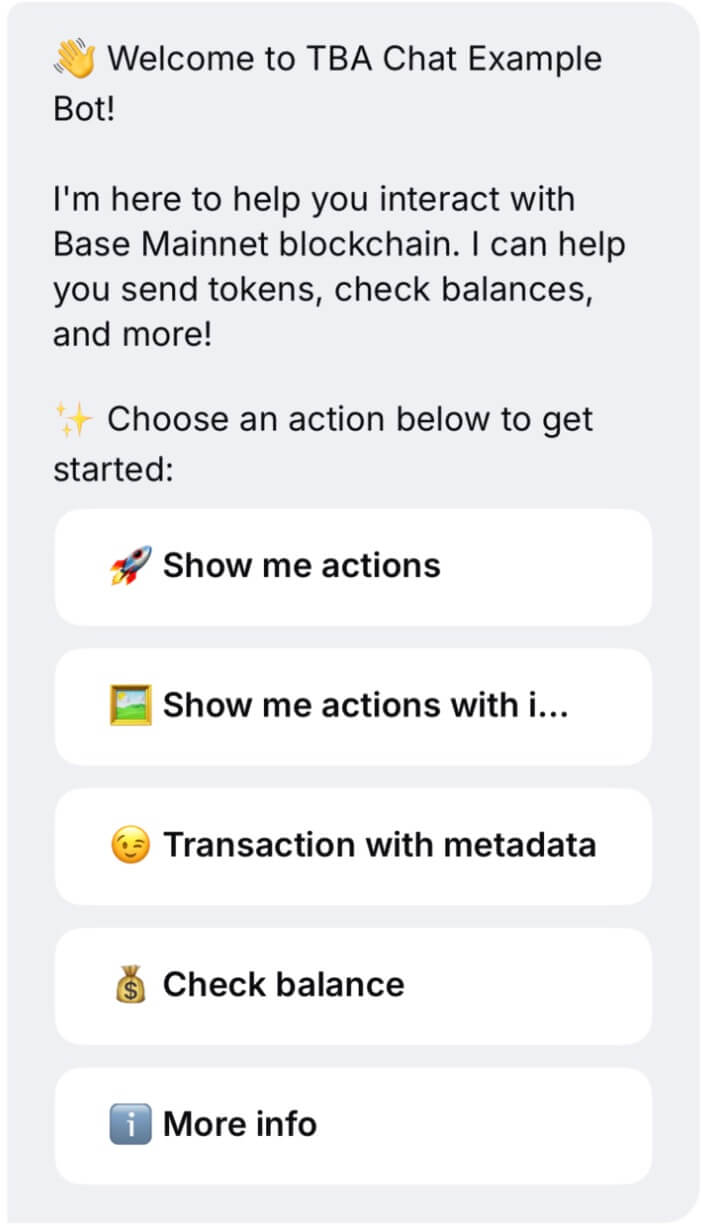
**Quick Actions (coinbase.com/actions:1.0)**
Purpose: Present interactive buttons in a message
Structure:
```typescript
type ActionsContent = {
id: string;
description: string;
actions: Action[];
expiresAt?: string;
};
type Action = {
id: string;
label: string;
imageUrl?: string;
style?: 'primary' | 'secondary' | 'danger';
expiresAt?: string;
};
```
Validation Rules:
* `id`, `description` are required
* `actions` must be 1–10 items with unique IDs
* Style must be one of: `primary`, `secondary`, `danger`
Fallback:
```
[Description]
[1] [Action Label 1]
[2] [Action Label 2]
...
Reply with the number to select
```
Example: Payment Options
```json
{
id: 'payment_alice_123',
description: 'Choose amount to send to Alice',
actions: [
{ id: 'send_10', label: 'Send $10', style: 'primary' },
{ id: 'send_20', label: 'Send $20', style: 'primary' },
{ id: 'custom_amount', label: 'Custom Amount', style: 'secondary' },
],
expiresAt: '2024-12-31T23:59:59Z'
}
```
 **Intent (coinbase.com/intent:1.0)**
Purpose: User expresses choice from Quick Actions
Structure:
```typescript
type IntentContent = {
id: string;
actionId: string;
metadata?: Record;
};
```
Validation Rules:
* `id`, `actionId` required
* Must match corresponding Actions
* `metadata` is optional, `<10KB`
Fallback:
```
User selected action: [actionId]
```
Example: Intent Message
```json
{
id: 'payment_alice_123',
actionId: 'send_10',
metadata: {
timestamp: Date.now(),
actionLabel: 'Send $10'
}
}
```
**Intent (coinbase.com/intent:1.0)**
Purpose: User expresses choice from Quick Actions
Structure:
```typescript
type IntentContent = {
id: string;
actionId: string;
metadata?: Record;
};
```
Validation Rules:
* `id`, `actionId` required
* Must match corresponding Actions
* `metadata` is optional, `<10KB`
Fallback:
```
User selected action: [actionId]
```
Example: Intent Message
```json
{
id: 'payment_alice_123',
actionId: 'send_10',
metadata: {
timestamp: Date.now(),
actionLabel: 'Send $10'
}
}
```
 ## Custom Transaction Trays
If you would like to display agent information such as favicon and branded title, utilize the metadata property of wallet send calls data.
#### **Example: Display agent information**
```ts
// example of wallet send calls data shape{
version: "1.0",
from: request.from as `0x${string}`,
chainId: this.networkConfig.chainId,
calls: [
{
...
metadata: {
description: "Transfer token",
...other fields,
hostname: "tba.chat",
faviconUrl: "https://tba.chat/favicon",
title: "Your favorite Agent"
}
}
]
}
```
## Custom Transaction Trays
If you would like to display agent information such as favicon and branded title, utilize the metadata property of wallet send calls data.
#### **Example: Display agent information**
```ts
// example of wallet send calls data shape{
version: "1.0",
from: request.from as `0x${string}`,
chainId: this.networkConfig.chainId,
calls: [
{
...
metadata: {
description: "Transfer token",
...other fields,
hostname: "tba.chat",
faviconUrl: "https://tba.chat/favicon",
title: "Your favorite Agent"
}
}
]
}
```
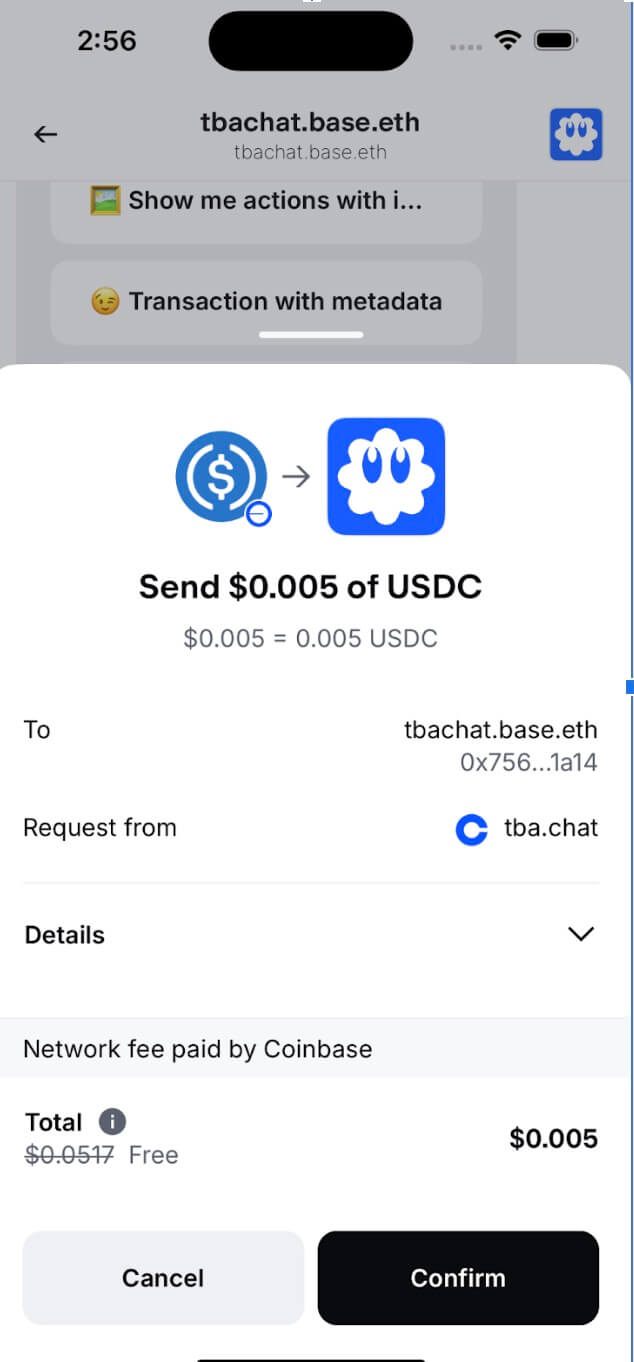 You can send “GM” to **tbachat.base.eth** to get more details about message content types we support and get the firsthand experience on by interacting with our agent
Our agent repo is found [here](https://github.com/siwan-cb/tba-chat-example-bot)
### Best practices
1. Always validate content structures
2. Provide fallbacks for unsupported clients
3. Test across client versions
4. Limit message and metadata size
5. Follow [XIP-67](https://community.xmtp.org/t/xip-67-inline-actions/941)
6. Your agent should respond to both direct messages and group chat messages (if applicable).
7. For direct messages, it should automatically respond.
8. We recommend reacting to messages with an emoji (like 👀or ⌛) to indicate the message was received, while the response is processing.
9. For group chat messages, agents should only respond if they are mentioned with the “@” symbol and the agent’s name. (example “@bankr”), OR if the user replies directly to a message from the agent (using the reply content type).
For group chat messages, agents should only respond if they are mentioned with the "@" symbol and the agent's name. (example "@bankr"), OR if the user replies directly to a message from the agent (using the reply content type).
## Getting featured
Fill out the form [here](https://app.deform.cc/form/52b71db4-bfa2-4ef5-a954-76c66250bdd2/?page_number=0) to submit your agent for review. Note, agents often go through multiple rounds of feedback before they are ready to be featured. Once approved, your agent will be featured in Base App. You will hear back from us within 5 business days.
Need help or have feature requests? Visit [https://community.xmtp.org/](https://community.xmtp.org/)
You can send “GM” to **tbachat.base.eth** to get more details about message content types we support and get the firsthand experience on by interacting with our agent
Our agent repo is found [here](https://github.com/siwan-cb/tba-chat-example-bot)
### Best practices
1. Always validate content structures
2. Provide fallbacks for unsupported clients
3. Test across client versions
4. Limit message and metadata size
5. Follow [XIP-67](https://community.xmtp.org/t/xip-67-inline-actions/941)
6. Your agent should respond to both direct messages and group chat messages (if applicable).
7. For direct messages, it should automatically respond.
8. We recommend reacting to messages with an emoji (like 👀or ⌛) to indicate the message was received, while the response is processing.
9. For group chat messages, agents should only respond if they are mentioned with the “@” symbol and the agent’s name. (example “@bankr”), OR if the user replies directly to a message from the agent (using the reply content type).
For group chat messages, agents should only respond if they are mentioned with the "@" symbol and the agent's name. (example "@bankr"), OR if the user replies directly to a message from the agent (using the reply content type).
## Getting featured
Fill out the form [here](https://app.deform.cc/form/52b71db4-bfa2-4ef5-a954-76c66250bdd2/?page_number=0) to submit your agent for review. Note, agents often go through multiple rounds of feedback before they are ready to be featured. Once approved, your agent will be featured in Base App. You will hear back from us within 5 business days.
Need help or have feature requests? Visit [https://community.xmtp.org/](https://community.xmtp.org/)